

*Updated July 2026
As a digital business, email is key to communicating with customers. It is very important to make sure that delivery of transactional emails, like purchase confirmations and license information, is reliable. Thus the need for a transactional email service. It may not be particularly exciting, but it is definitely an important consideration. There are plenty of providers out there, but I’ve narrowed down the list a bit to these: Mailgun, SendInBlue, Postmark, SendGrid, Mandrill, Mailjet, and SparkPost. Others have ruled out Mandrill as it requires a paid MailChimp account, but I just happen to have one of those. So I figured I might as well give Mandrill a try too. I also tested out Mailtrap more recently.
What is Transactional Email?
As I’ve alluded to, transactional email includes things like purchase confirmations, license information, invoices, subscription and billing reminders, etc. It all seems so ho-hum… until it isn’t getting where it needs to go. You can find a lot more information about what transactional email is, and how/when to use it from the folks over at mailtrap.io.
I’ve been pretty fortunate so far. I send all my transactional email through a Digital Ocean droplet, and the reputation for the IP address is pretty good. The two problems I’ve had are an odd blacklist in Chile, and bad neighbors. When some jerk signs up for Digital Ocean and starts using their droplet to send out spam in the same network subnet as my droplet, email delivery from that subnet can suffer. In particular, when lists like UCE Protect detect a spammer, they like to blacklist entire subnets (groups of servers). While Digital Ocean doesn’t tolerate spamming, it takes a few days for the listing to clear.
I started looking for a transactional email provider to avoid such issues, but there’s something else in the mix here. While my primary mail server has a good IP address, I have 17 servers, and I can’t say the same for all of them. Configuring SPF and DKIM to improve reliability across such a server fleet gets messy fast. As a result I’ve configured all my servers to relay mail through the primary email server. The problem is that I’m trading one mess for another. Setting up firewall rules for 16 other servers, making sure to include both IPv4 and IPv6 addresses, updating the allowed relay IPs list on the primary (again with IPv4 and IPv6 addresses), and trying to automate all that, is a real pain in the neck.
Requirements
I’m not looking for awesome, but if we find it in the process, all the better. What I am looking for are these:
- Ability to send email via PHP.
- Ability to send email via SMTP.
- 100% delivery rate. If they can’t deliver my emails, I might as well go back to my old setup. This doesn’t include bad addresses and the like. I’m simply looking for a service that keeps their IP addresses clean and off any blacklists. If they are smart, they shouldn’t use an IP address when it is on a blacklist.
Mailgun
I had originally planned to only test Mailgun and SendGrid. However, SendGrid blocked my initial signup, so I tried a couple others in the meantime. That also meant that Mailgun was the first transactional email platform up for testing.
Mailgun had a nice looking interface, and made it nice and simple to setup SPF and DKIM records for best deliverability. They also mentioned something interesting during setup. They recommended using a sub-domain like mg.example.com for sending transactional email. If the reputation of your sub-domain gets ruined for some reason, you can ditch it and move on. That would be a lot harder to do if you used your primary top-level domain (like example.com).
Extras with Mailgun
The setup also included setting up a CNAME for tracking opens and links, which is a nice bonus. “Open tracking” uses invisible images, which some email clients block, but human curiosity tends to take care of that. They also included instructions for setting up MX records for the custom sub-domain. You can use this in conjunction with their API to perform certain actions when your custom sub-domain receives an email. That isn’t something I planned to use, but I will continue to note services which have similar features.
Mailgun allows reduced their free plan to 100 emails/day, and I wouldn’t be surprised if that was partially due to abuse 10,000 free emails each month, which is a nice feature, but I wonder how much abuse they see from that. They did require a credit card before allowing much activity, so I suppose that helps weed out most spammers. At any rate, 10,000 emails/month should be enough for my needs currently, but isn’t free anymore. However, at $15/month, it’s pretty comparable to other quality senders.
The Beginning of the End
Call me weird, but I don’t use Composer with any of my PHP projects (at least not back in 2017). Most of the scripts I would be sending email from are completely standalone. While I use some extra libraries, using Composer just seems nuts to me. Mailgun’s PHP library only works with Composer. I was about to give up on them, but then I found a couple posts that detailed how to build your own Mailgun integration using PHP and Curl.
I also wasn’t quite sure how to setup Mailgun with Exim4, but an article on the SendGrid Docs showed me the way. With that done, I let things run overnight and checked back on the dashboard the next morning. And that was the end. In less than 12 hours, one email had already been blocked because one of their servers was on the Proofpoint blacklist: “5.7.0 Blocked – see https://support.proofpoint.com/dnsbl-lookup.cgi?ip=184.173.153.201”.
SendInBlue Brevo

This transactional email service also has a free tier where you can send up to 300 emails/day. This should be sufficient for my business currently, so the price here is free. Signup is simple, but the lack of custom domain setup surprised me. I suspect one of the paid plans might include custom domains, but nothing on their pricing page indicates such a thing.
Marketing vs. Transactional
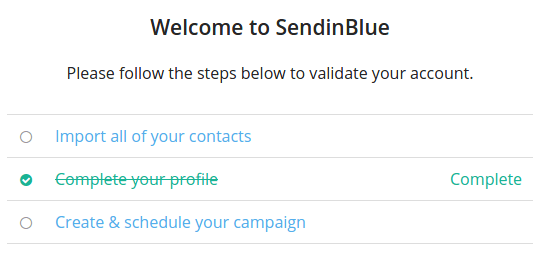
Once I logged in, Brevo requires email and mobile phone validation, similar to Mailgun. Once I verified those, I landed on the dashboard page. Here’s where things got interesting. The dashboard gave me three steps to “validate” my account. Two of the three steps were things totally irrelevant for transactional email. They were clearly pushing the marketing side of their email service:
- Import all of your contacts
- Complete your profile
- Create and schedule your campaign
I didn’t really want to do 1 & 3, but my account was limited to 300 emails per day. Not knowing if that would be enough, I figure I should validate my account. So, I complete my profile, and then try importing a few emails and sending out a test campaign. The profile worked properly, but the others still show as incomplete. Further review shows that the free plan only allows 300 emails per day. That makes makes sense since 300 x 30 = 9,000.
Integrating SendInBlue Brevo
Brevo seems to focus more on marketing emails, which made me nervous, but I want to give SendInBlue/Brevo a fair shot. Next, I started with their PHP integration, but the link in their setup steps sent me to a deprecated library. Fortunately, the deprecated library had a link to the new one, but that was a bit odd. Also, one other place had the link to the deprecated library twice:

The API library docs were also a bit sparse, with just a simple three line example, and no mention of how to send an email. With the lingering aftertaste from the outdated link, this didn’t help matters much. Fortunately, a little browsing around the docs found an example of how to actually send an email. Finally, I had a test email sent! Or at least that’s what it said in the dashboard. I had to wait for 20 minutes for delivery of my test email. I discovered that “Sent” merely meant the email was in the queue. Once they sent the message, the log showed the status as “Delivered”.
Slow Mail is No Mail
While it isn’t as bad as a bounced email, slow email can frustrate customers. SendInBlue/Brevo has another downside though. They include their branding on your emails, unless you pay an extra $12/month. That’s on top of whatever plan (free or paid) you already have! After the inconsistent PHP documentation, the slow email delivery, and the unwanted branding, I was done with SendInBlue/Brevo.

Postmark
Reviews indicated Postmark was more expensive and geared toward higher-end clients. However, I was nearing the end of the day, Mailgun had turned out to be unreliable, and SendInBlue was slow. I still hadn’t heard back from SendGrid, so I gave in and signed up for a Postmark account. They have a very generous free trial of 25,000 credits The free plan includes 100/emails a month, once they’ve manually reviewed your signup information. At once, this inspired a bit more confidence than those with completely automated signups. Beyond the 25,000 credits there is no free plan. The paid plans start at $15 for 10,000 emails per month. Back a couple years ago, they raised a ruckus when they announced plans to charge (a lot) more for verified domains above the 5 included on the Basic plan. However, you can get unlimited sending domains for a mere $3 more in 2026.
Integration with Postmark
Postmark had a very simple setup for DKIM and SPF, which included MX and CNAME records similar to Mailgun. I really appreciated their API documentation, which included PHP instructions for Composer, and without Composer (for folks like me). While manual verification might slow you down a little, their setup process is quick and straightforward. I also kept a close eye on the spam score assigned to my test emails. While it will vary some depending on the content of the test email, the scores on Postmark emails were several points lower than SendInBlue, which is great for delivery.
More Perks
Postmark was the only service that doesn’t didn’t allow marketing email. Their sole focus is While their main focus is on providing a transactional email service, they also provide broadcast/bulk email sending capability. Still, blacklists are less likely to flag their servers for spam, because marketing emails are sent through separate servers. I’ve seen folks flag a legitimate email as spam because they didn’t bother to unsubscribe, so that’s definitely an important distinction. Additionally, the custom domain allows them to send emails without them saying “sent as” or “on behalf of”. Unlike SendInBlue, they can use legitimate addresses from your custom domain without triggering spam filters.
Postmark includes automatic open and click tracking, and they even have chat support available from the dashboard. Lack of support is one reason I didn’t try Amazon SES. Most of their computing services do not include support, you have to pay extra for that.

They also have a bonus for bootstrapped startups: 50,000 free credits if you are charging for your products and have not taken any outside funding. There was one more thing that I haven’t seen anywhere else. Their logs include the message contents of all emails sent. That may not matter for some, but I found this really handy (and have used it extensively over the past few years).
Delivery Rate
Delivery was almost instant with Postmark, and they update their logs very quickly too. After leaving Postmark active all weekend, only two emails bounced, and these were invalid addresses, not blacklist rejections. All of the services will automatically disable sending to bounced addresses, to improve delivery rates. However, I had wondered what would happen if you needed to re-enable an address. For such an occasion, Postmark has a built-in reactivation button, accessible right from the logs.
So far, Postmark has a lot going for it. We’ll see if SendGrid can dethrone them.
Update 6/2026
Over nine years later, and I’m still a happy Postmark customer. Their service is fantastic, both the actual technical stack and their support. Pricing has changed a bit, for the better, and I’m now paying around $20 for 15-20k emails/month.
SendGrid (Twilio)

Pricing for SendGrid’s transactional email service is $19.95/month for 50,000 emails. That’s not terrible pricing, with room to grow, but probably not great for many folks. They do have a free trial with 100 emails/day, but that’s only for 60 days.
As I mentioned before, SendGrid’s automated filters blocked my signup. As a result, I had to email support to manually activate my service and it took 6 hours for a response. Then, once I replied with the required information, it took less than 30 minutes for review and activation. Most of these services send out welcome emails and such, but I received nothing from SendGrid. This was probably a glitch due to manual activation of my account. As a result, I had to have the email verification resent, which ended up in my spam folder. Not what I was expecting from a reputable provider, but I pushed on regardless.
Sending via the Grid
Here is where SendGrid really shines. Integrating SendGrid into your PHP application (or one of several other languages) is dead simple. They walk you through the entire process, with complete code examples. As I noted earlier, the SendGrid docs were also where I found documentation for setting up Exim4. So SendGrid definitely leads the pack on ease of setup and integration. When it came to domain validation, it was a little bit awkward though. The buttons and terminology were not as clear as they could have been. As a result, several times I thought I had missed something, only to find out that I wasn’t at that step yet. So my only real complaint with their setup process was the domain verification.
Verifying a custom domain was similar to the others, except there was a Default checkbox when I was setting up the DKIM and SPF records. It claimed that checking the default box would make it the default domain for click and open tracking as well. I didn’t see how that could be, as custom domains for click/open tracking usually require a CNAME, and there was no mention of any CNAME records to add. When I sent a test email, it confirmed my suspicions, as there were no links to my custom domain for verification. So I proceeded to setup a custom link-tracking domain. Strangely, the open/click-tracking domain needed to be unique from the previous domain I setup with them. Once I set that up, a second test confirmed it was working for open-tracking.
Performance
Emails sent through SendGrid seem to be very quick, at least on par with Postmark, which is saying something. However, their activity logs are a bit lacking. In my testing, the logs were a bit slow to update, but that’s not a huge issue. On the positive side, there is nothing to click on, even though the cursor makes it appear you should. Instead, there is a little information icon for each log entry that displays the delivery status when you hover over it. On the other side, the logs don’t contain message subjects. So if you send multiple emails to a customer, it will be impossible to tell which specific email is being referenced. The graphs on the dashboard also lag behind a day. Perhaps they are trying to conserve resources, but every other platform I tested has real-time graphs available.
I ended up having a small issue where I emailed support for assistance in resolving. This time, it took about 4 business hours to receive a response. Fortunately, it turned out I had a typo in my code, so that was an easy fix. One thing I’m not particularly pleased with is that their servers convert plain text emails to HTML. That by itself wouldn’t be a problem, but the line breaks do not appear to convert properly.
Delivery Rates
I kept a close eye on the delivery rate for SendGrid, because I had already seen SORBS listings in the spam headers. Most providers shouldn’t block (solely) on a SORBS listing. However, I noticed later that spamcop.net had blacklisted one of the two IP addresses sending my messages as well. Sure enough, within the first 24 hours, I saw my first block. That’s one block too many in such a short period of time. With the line break conversion issues, the blocked email, multiple blacklists, and the fact that the activity log was very limited in detail, SendGrid was a no-go.
Mandrill
Mandrill is the most expensive transactional email service in my tests. You can only use Mandrill if you are a MailChimp user (minimum $10/month). The email credits come in blocks, at $20 per 25,000, but unfortunately the credits expire at the end of the month. Fortunately, they give you 500 credits to test things out, so that’s what I’ll be using. They do impose an hourly limit of 25 emails, lower than any other I’ve seen. Hopefully that doesn’t become a problem. With paid accounts, the hourly limit adjusts automatically depending on your reputation and usage patterns.
Domain setup
This is getting to be old hat by this time. The interface for adding domains was pretty clear, although they didn’t pre-populate the domain name like some others did. I ran into a small snag, which is that you must have an email address under whatever domain you choose. So unlike others that recommend you use a separate sub-domain, that wasn’t really an option. That is, unless you want to go through the bother of setting up a brand new email address and MX records just for domain verification… The open/click-tracking domains have their own menu item, and setup was as quick as adding a CNAME record. It took less than 5 minutes to have my domains setup and verified.
Mandrill Integration
While Mandrill doesn’t have the sleek walk through like SendGrid, their documentation was easy to follow, and I had my PHP function setup in no time. The instructions included steps for folks on either side of the fence with Composer, which is always nice to see. The only oddity I’ve noticed is that the “from name” is missing from some of my system notices. Not that I care whether the email says “Cron Daemon” or not, but it leaves me wondering “why?” It took 4 business days to receive a first response from support, but they finally discovered the reason. Normally, a “From” header looks like “Sender <[email protected]>”, but the cron daemon is sending it like “[email protected] (Sender)”. That isn’t a huge issue, and I don’t imagine it affects “normal” usage of Mandrill.
You do need to be sure that you have added all domains that you use to send email. Most of the other services have a fall-back feature if the sending domain doesn’t match a verified domain. Instead, Mandrill will simply reject any attempts to send using an unverified domain. This is further confirmation that using sub-domains with Mandrill is a bad idea. For example, say you setup a sub-domain for sending like mandrill.example.com, but you are sending your emails from [email protected]. Mandrill will reject those emails, since the domain portion doesn’t match exactly. The reverse is also true: if you validate example.com and try to send email from [email protected], they will also reject the message.
Bonus?
Mandrill’s activity log seems more streamlined than Postmark, and does includes the ability to see the message contents. Mandrill doesn’t include the ability to view the original raw message (headers and all). However, it does have a Resend button, which is something I haven’t seen anywhere else. It also includes a graph above the logs to visualize your sending data better. While pretty much all of these transactional email providers have graphs, most are on a separate page.
Mailjet

Mailjet has a free plan with 6,000 transactional emails month. I’m not sure if that will be enough, but their next plan is still decent at $9 for 8k emails. Signup was quick and simple, but this was another case where the signup email ended up in spam. Similar to SendGrid, the message structure caused the issue and not the server setup.
Setup with Mailjet
Mailjet’s domain verification uses a little different process. Instead of the usual DNS verification, they use a text file on your website to verify ownership. This may present a small problem for some folks who use a domain for email that does not have a website setup. The process doesn’t require DKIM/SPF setup, but it was easy enough to setup through the domain management page afterwards.
The management interface contained code examples with a link to the PHP library on GitHub. The GitHub page included a link to a separate repository for non-Composer integration. The main page for the alternate repository gave plenty of example code, and I sent a test email in short order. Once I sent the test email, I discovered a perk unique to Mailjet’s transactional service. Anytime they auto-validate a new address on one of your custom domains, Mailjet sends you an email notification. This could be handy to prevent misuse of API credentials.
Does Mailjet Deliver?
While the “real-time email stats” aren’t exactly real-time, email delivery seems to be pretty quick. Within the first hour, one message said “Sent” but not “Delivered”. I clicked on the message for more detail to see what was going on. The message detail page claims that they delivered the message, but the activity log does not update. Contacting support reveals that the message is still in the queue as it had encountered a problem on the receiving end. They said that there is a bug with the message details screen, but the activity log is accurate.
Mail headers indicate that the SORBS blacklist contains several of Mailjet’s servers, so I kept a close eye on the logs. Unfortunately, the activity log only lets you see the last 50 messages. The log has toggles for “Last 24H”, Today, Yesterday, and Last Month, but they don’t work. No matter what I do, I cannot go back to check the status of that delayed message. Their message detail page is also lacking something any useful detail whatsoever. If the destination server bounces a message, there is no indication of why.
Within 24 hours, the logs showed one message stuck in the queue and another with a status of “bounced”. I sent a message to the bounce recipient to see if it was an invalid address, but the customer responded just fine. Since the log just says “bounced”, I had to contact Mailjet support for more detail. Apparently, Mailjet has the information I need, and I can access it via their API. So, why don’t they make that information easy to see? I still don’t know why they can’t process the “stuck” message either, so with that, we say adieu to Mailjet…
Mailtrap (tested in 2026)

Mailtrap has a free plan with 4,000 emails/month, though they cap it to 150/day in order to combat spam and abuse. The Basic plan starts at $15/month, and includes 10,000 emails/month. There are extra features on higher plans, but bumping from 10k to 50k is only $20/month, so that seems pretty reasonable. What I don’t love is that the email logs are limited to 5 days, yikes! But for some use cases that’s just fine. Besides, I use the FluentSMTP plugin these days, and it logs everything for as long as I like anyway.
Sorting it Out
From the start, the setup process is pretty solid, but I did get a little lost in the dashboard structure until I figured out that it was separated out by the three services they offer:
- Email API/SMTP (the only thing I really needed)
- Email Sandbox for testing emails
- Email Marketing, a hosted solution
The onboarding was mostly all right on the Home panel though. First, they ask for your domain, but then you don’t use it yet. In the welcome email, it had a link to verify a domain, but that took me to a page that asked me to add another domain. I knew I already did that, so clicked All Domains and there it is. I decided to stick with the onboarding and ignore the email for the moment, and the next thing it did was take me to sample PHP SDK code. It didn’t have a link to the actual SDK, but there is an Explore SDKs widget on the right panel, and there it was!
Composure (a side note)
While back in 2017 I was very hesitant to mess with anything that required Composer, we eventually needed it for a couple core PHP libraries. So when it came to setting up the Mailtrap SDK, I just used Composer and didn’t worry about it. I’ve no idea if it is possible to setup Mailtrap without it, and I wasn’t about to waste time trying to find out. Now, back to the setup.
Interestingly, Mailtrap has you run the test code first with a demo domain, to make sure the SDK is working, and it was. That’s a nice touch since you don’t have to wait for DNS or anything before you can try it out. Then, we’re back to verifying our domain. It’s the usual process with a bunch of DNS records to update, but when I first hit Verify, it was a bit confusing. The page said it was verified, but a couple items still showed red marks. A refresh of the page, and all was green.
They don’t do manual human verification like Postmark, but they do have an automated compliance check at this point to help weed out spammers. I’m a fan of anything that weeds out the bad eggs, and it was quite fast.
Finally, they have you update the sample code to use your real domain and run one more test. It worked, and since I now already have the SDK installed, it was super easy to adapt the sample code to our email sending routine on our servers. I wasn’t about to mess with our SMTP config for low-level emails, but I got to test their SMTP connectivity anyway. See, FluentSMTP doesn’t have a direct Mailtrap option, but they DO have an SMTP option, so I set that up with Mailtrap and it worked flawlessly.
Sandboxes, Testing, and Logging
Since they had the Sandbox feature, and it also has a free tier, I tried it out and it was pretty simple also. It was there that I noticed that each email has a Spam Analysis with a score, and what I think are SpamAssassin rule notations. It’s certainly won’t guarantee that every provider will see your emails the same, since the bigger services have their own custom spam metrics. Even better, I discovered that the email logs for live emails let you see the same Spam Analysis.

With that, and the incredible amount of detail they show, I can certainly appreciate the logging capability of Mailtrap. I just wish it was stored longer than 5 days because not all of our email goes through WordPress and FluentSMTP. We have an add-on with Postmark that allows 45-days for just a few dollars, and it’s come in handy multiple times.
Speed and Reliability
Sending speed with Mailtrap was super fast. One time I barely had time to change over to my email tab and the email I sent popped in a second later. Similar to Postmark, Mailtrap supports sending bulk email via the API, but they make sure it uses a separate endpoint and completely separate servers to avoid any cross-contamination.
I only had a few send failures, and they were all server issues with the recipients, with no problems on Mailtrap’s end. I double-checked my Postmark logs and saw the same exact failures for previous emails to these recipients. So Mailtrap had 100% email delivery and checks off all the boxes for us. I might seriously consider switching if their log retention were not so short, and if I had any dissatisfaction with Postmark.
SparkPost

When MailChimp converted Mandrill into a (much more expensive) paid add-on, SparkPost stepped in to try and fill the gap. No one else I looked at has a more generous starter plan. Their free plan comes with 1,000 emails each month. If you need the next plan with 100k/month, it’s $15/month similar to several other services. Seems the free plan has gotten worse, while the paid plan got cheaper (by about $14/month).
Off to the Races
SparkPost wastes no time in getting things rolling. As soon as you signup, they walk you through domain verification. SparkPost also continues the trend of abnormal verification. Instead of DNS verification, they use your postmaster or abuse email addresses. This can be tricky, because it requires that you actually have a postmaster or abuse address configured. Once you choose which email to use for domain verification, they jump right into sending email. SparkPost provides you with SMTP credentials as well as an API example using Curl. You can copy the Curl example as-is since it includes your API key and email address for testing.
After you click the domain verification link from your email, you can setup DKIM/SPF just like any other transactional email provider.
Sending Email, Maybe
I began to setup my PHP integration, but that is where I hit a snag. SMTP is easy enough following the instructions from SendGrid, but I could not find non-Composer instructions for PHP anywhere. They use Slack instead of a forum for asking development and integration questions, so that is handy. One of their developers was looking into what it would take to use SparkPost without Composer, but the conversation stalled out after a few days and was marked as “wontfix” four years later. Yikes!
Making the Call
In my search for a reliable transactional email platform, four candidates have made it through to the end without any emails blocked: SendInBlue (Brevo), Postmark, Mailtrap and Mandrill. However, as I mentioned earlier, SendInBlue has too many red flags for me to trust them with my business. I could look beyond their apparent focus on marketing emails. However, the outdated documentation links, the sluggish email delivery, and the unwanted branding are just too much to overlook.
I also ditched MailChimp (owner of Mandrill) several years ago as the pricing just kept going up and up. Kudos to them for keeping the transactional email pricing down, but Mandrill is no longer an option for me anymore.
However, Postmark and Mailtrap both provide a reliable transactional email product. They have nice activity logs with the ability to view message content. Postmark allows re-activation of banned emails right from the logs, and Mailtrap has their snazzy Spam Analysis and Sandbox tool. Pricing is very similar, with Mailtrap getting the edge on high volume accounts. On the other hand, I received 75,000 credits to use for my transactional emails at Postmark. So I can use Postmark with no cost for several months, and we still use Postmark 9+ years later.
Conclusion
If you’re sending less than 20,000 emails a month, Postmark is hands down the best option for transactional email. The other bonus to Postmark’s pricing is that credits don’t expire. However, if you go over 20,000 emails per month, Mailtrap is going to be the cheaper option. If you don’t need extended log information, Mailtrap is great. They both have fantastic support, and either way you’ll be in good hands. And you’ll also be glad you read this instead of an article on dirt…
P.S.
Shameless plug here, if you want to see transactional email in action, sign-up for our image optimization service. We’ll send you a few, but hopefully not too many! Disclaimer: I have no affiliation with any of the companies above, other than being a customer. There are no affiliate links, and I make no money for my opinions, but I sure hope they help you.
